AI agents are software that runs on its own. They don't need you to hold their hand for every step. Instead, they combine large language models with planning, memory, and tools to finish multi-step tasks while you do something else.
This shift from asking ChatGPT for help with one thing to deploying an agent that handles a whole workflow is a big deal for solopreneurs. It changes the math on what you can accomplish alone. You're not just faster; you have leverage.
What's Actually Inside an Agent?
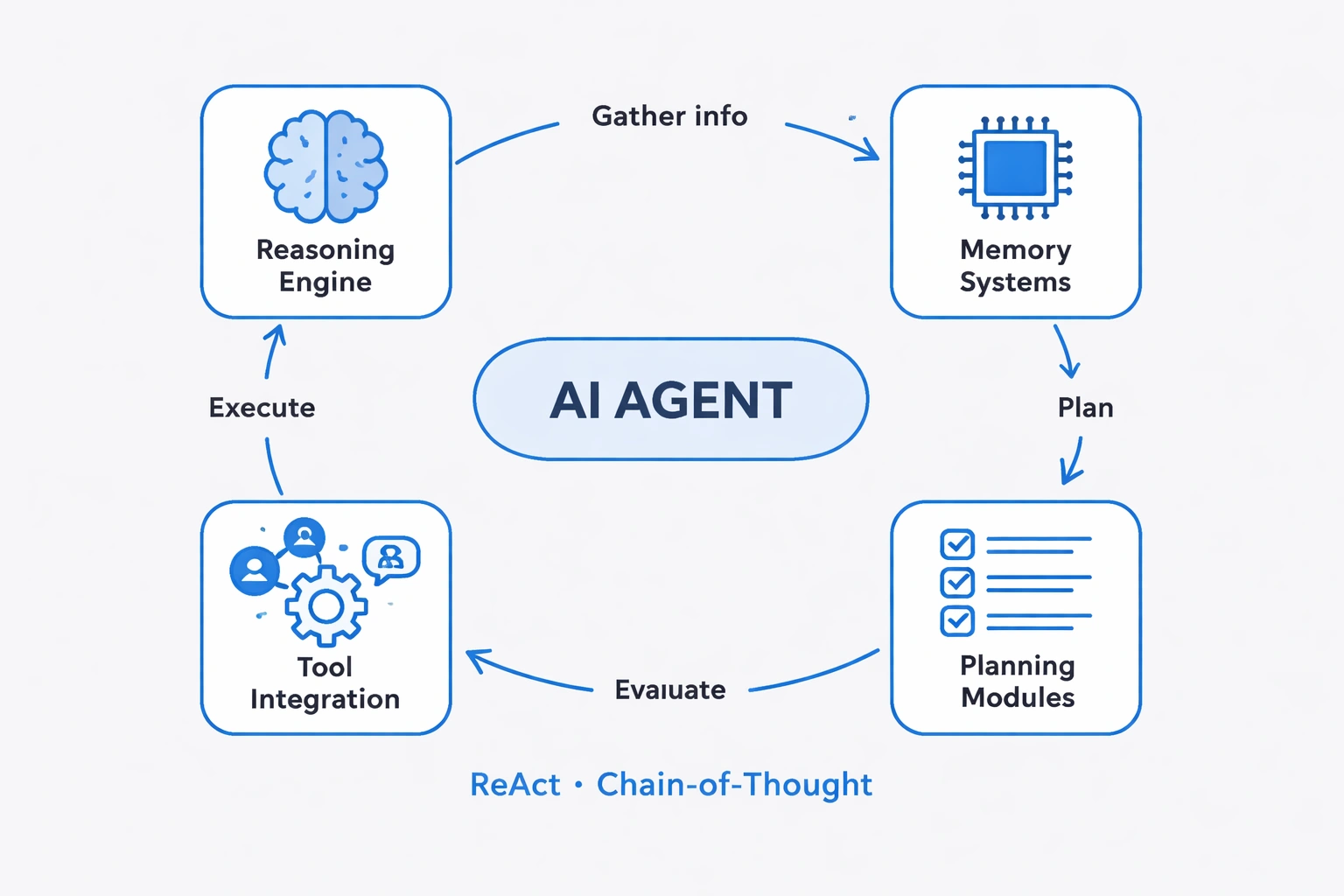
There are four moving parts. The reasoning engine is the brain — it processes info and decides what to do next. Memory systems hold context, so the agent doesn't forget what it's doing halfway through a task. Tool integration lets it talk to other software (your email, your database, Slack). Planning modules break big goals into steps.
Put them together and you get something that mimics how we work. We gather info, make a plan, do the work, check if it worked, and fix it if it didn't. Agents do the same loop using techniques like ReAct (Reasoning + Acting) and Chain-of-Thought prompting.
Frameworks like LangChain made it possible for regular developers — not just ML engineers — to build these things. LangChain gives you the pre-built parts for memory and tools. Repositories like Hermes Agent go even further, offering specialized setups for specific jobs.
Do You Actually Need One?
This isn't a theoretical question. It's an ROI question. Look at your week. Where are you doing repetitive work that needs some judgment but follows a pattern? Customer intake forms, sorting research, basic email replies — that's the sweet spot.
Run the numbers. A $50/month agent that saves 10 hours of your time is an easy call. A $500/month agent that needs 5 hours of supervision is a bad deal.
Also, be honest about what agents are bad at. They're great at synthesizing information and sorting email. They are terrible at nuance. If you need a consistent brand voice or a delicate negotiation, keep the human in the loop. Test them on old data first — don't let them learn on live customers.
Security matters here. If an agent can read your email, it needs solid authentication. Check where the data lives. Tools like ChatGPT have enterprise tiers that keep your data private. Use them for sensitive work.
Building Without Code
You don't need to be a programmer anymore. No-code platforms let you drag-and-drop your way to a working agent. Pick a model, give it tools, write instructions, and set some boundaries.
Start small. Trying to automate your entire business on day one will fail. Try email classification first. The agent reads an email, decides if it's urgent, pulls out the key info, and files it. You can check if it was right.
Which model you pick matters. GPT-4o is smarter and more reliable but costs more. Llama 3.1 is open-source and cheaper, and honestly, for simple tasks, it's often good enough. Don't pay for a Ferrari engine if you're just driving to the store.
Your instructions are the job description. Be specific. Don't say "help with customers." Say "answer product questions using our docs, send refund requests to email@company.com, and stay friendly." Vague instructions lead to weird behavior.
Test it like you're trying to break it. Give it weird inputs. Give it nothing. Give it two contradictory orders. It's better to see it fail in a test than in front of a client.
Hooking It Up to Your Tools
Tools are what turn a chatbot into a worker. This connection layer lets the agent read your CRM, create tasks in Asana, send emails, or query a database.
APIs are the standard way to do this. Your agent makes requests to the software's endpoints. Most no-code platforms already have integrations for Slack, Google Workspace, and Salesforce. If you need something custom, you'll need a developer.
Or just use Zapier or Make. They sit in the middle and translate between your agent and your tools. It adds a little delay and one more point of failure, but it saves you from writing code.
If your agent needs to read business data — like checking order history before replying to a customer — give it database access. But start with read-only permissions. You don't want a confused agent wiping your customer list.
If it needs to read files, lock it down. It should only see the folders it needs. Tools like GPT Engineer show how agents can move through project structures, but that power needs limits.
Making Agents Work Together
You don't just run one agent. You run a few, and they hand work to each other. It's like a tiny team.
Here's a workflow: Agent one does research. Agent two takes that research and writes a draft. Agent three edits it. Each one does one job well. You don't need a "super agent" that does everything.
Handoffs need to be clean. Use JSON. Pass along notes about confidence — like "I found this info, but I'm only 60% sure." The next agent needs that context.
Set up clear rules for when an agent gets stuck. If confidence is low, or it finds weird info, it should stop and ping you. An agent that says "I don't know" is better than one that hallucinates an answer.
Watch the whole system. Track how long tasks take and how often they fail. Treat it like real infrastructure.
What Else Can They Do?
Research agents are quietly incredible. You send one off to scan 50 websites and come back with a summary. It does in 20 minutes what would take you all afternoon.
Creative agents are hit-or-miss. They're good for generating options — here are five layouts, here are three angles on a story — but you still have to pick the one that works. They're a sounding board, not a replacement.
Customer service agents are solid for the easy stuff. They answer "where's my order?" instantly. But if a customer is angry or has a weird edge case, you want a human stepping in.
Data analysis agents are great if you're not a data scientist. Point one at your analytics, ask "what changed this week?" and get a chart with an explanation.
Personal productivity agents act like an executive assistant. They manage the calendar, draft emails, and keep your to-do list in check.
The Legal Stuff Nobody Wants to Think About
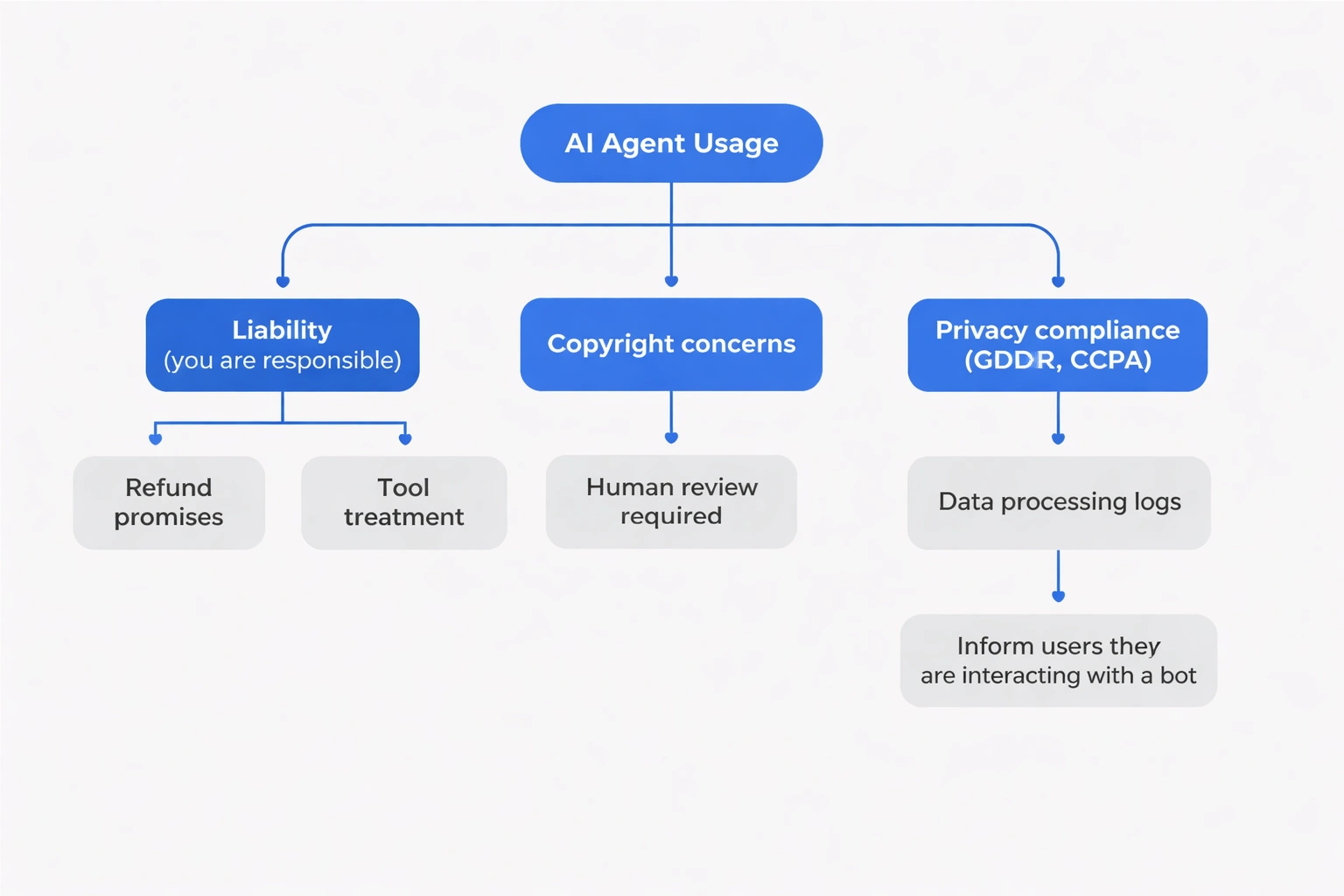
If your agent messes up, you're on the hook. There's no real precedent yet, but the safe bet is to treat it like a tool. You're responsible for what it does. If it promises a customer a refund you can't afford, that's your problem.
Copyright is messy. Platforms say you own the outputs, but can you copyright something an AI wrote? Maybe, maybe not. Just have a human review anything important.
Privacy laws (GDPR, CCPA) apply to agents too. If it's processing customer data, you have to be compliant. Keep logs of what it touches.
Don't trick people. Tell them if they're talking to a bot.
Watch for bias. Agents learn from data. If that data is biased, the agent will be too. Check its decisions now and then.
Is It Actually Worth It?
Do the math. Measure how long a task takes you. Then measure how long the agent takes plus how much time you spend fixing it. That's your real number.
Check quality. Did it get the facts right? Did it sound like you?
Add up the costs: subscription, API fees, maintenance time. Divide by tasks. Is that cheaper than your hourly rate?
Think about scale. If your business doubles, can the agent handle it? Or will it break?
Ask your customers. Did they like the faster response? Did they notice the bot? If they're happier, keep going.
Keeping Up
This stuff changes fast. Don't lock yourself into one vendor. Build on open standards so you can swap things out. Our repos directory tracks the new stuff.
Learn the basics — how prompting works, how models think. LLMs from Scratch is a good place to start. That knowledge stays useful even as the tools change.
Talk to other people doing this. Collections like Awesome Claude Skills show what's actually working.
Set aside budget just for experiments. Try things. Most will fail, but the ones that work give you an edge.
Your agent setup is an asset. It grows with you. The gap between solo founders using agents and those doing everything manually is going to get wide. Start now.
Check out our tools directory for platforms. Look at our models section to pick a brain. Pick one workflow, test it, and see what happens.